
Secrets
Crow CI provides an integrated secret store.
These secrets can be passed securely to individual steps using the from_secret keyword.
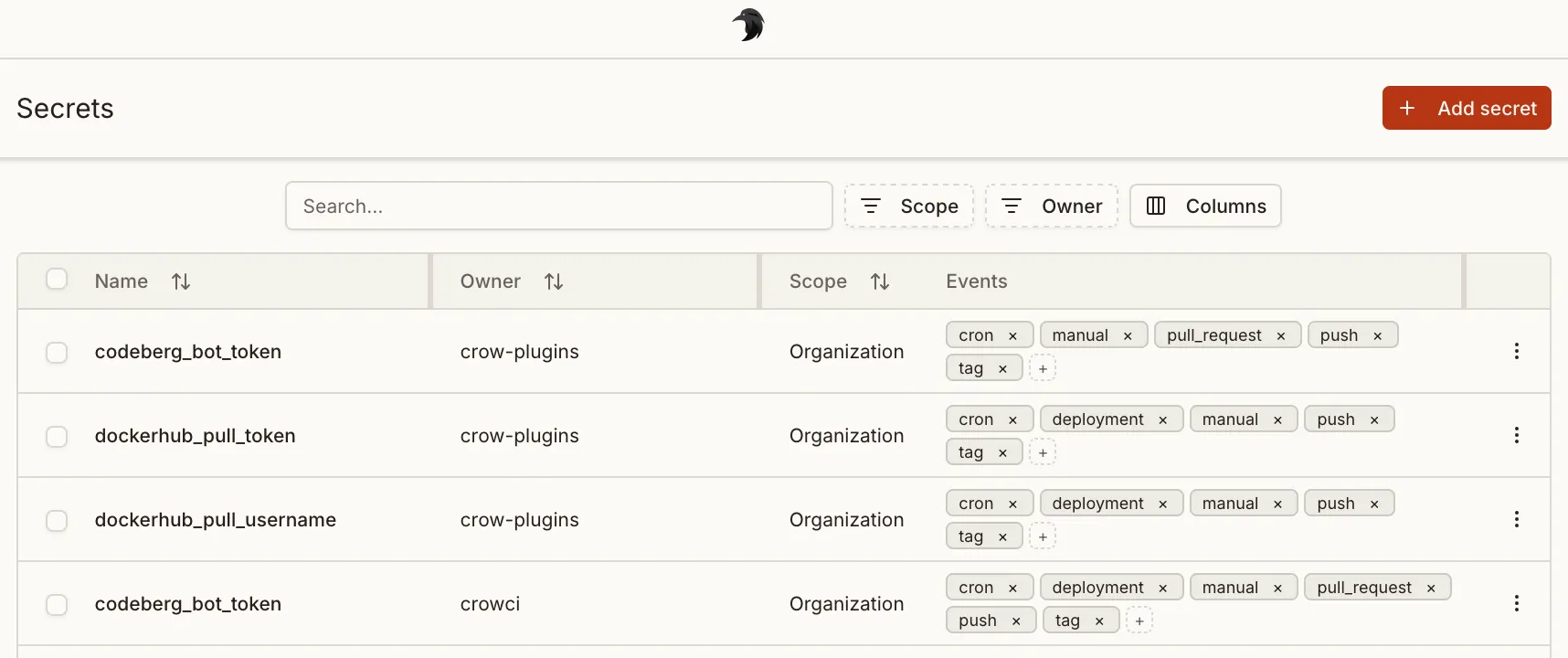
The repository, organization and global secret pages all use this same table. It supports searching by name, sorting and hiding columns, editing the events of a secret inline, and selecting several secrets to delete them at once. Secrets inherited from a broader level are listed as read-only on the narrower page: an organization secret shown on a repository page can only be changed from the organization’s own settings.
The Secrets page in the sidebar lists your personal secrets, the secrets of repositories you have push access to, the secrets of organizations you administer, and global secrets. Repositories you can only read and organizations you are a plain member of are not listed. Global secrets and secrets shared with one of your repositories or organizations are read-only there unless you may manage them at their owner level.
Levels
Section titled “Levels”Three different levels of secrets are available:
- Repository secrets: Available to all workflows of a repository.
- Organization secrets: Available to all workflows of an organization.
- Global secrets: Global secret are available to all pipelines of the entire Crow CI instance. Can only be set by instance administrators.
Defining secrets
Section titled “Defining secrets”Secrets are defined using the from_secret: keyword in the environment: section:
Secrets names can be uppercase or lowercase. The same applies to the environment variables they are assigned to.
Secrets can also be used for settings: in plugins:
Secrets in workflow templates
Section titled “Secrets in workflow templates”A workflow template never names a secret of a repository.
It declares aliases, and the workflow file that uses the template maps every alias to a secret under template.secrets.
An alias is mapped with from_secret, which names a secret as it does in a step and never holds a value:
A step of the template that reads from_secret: sonar_token gets the secret SONAR_TOKEN of this repository.
From there it is a step like every other: the server resolves the secret when it builds the workflow, the event and plugin filters of the secret apply, and the value is masked in the logs as for every step.
See How a mapped secret reaches a step.
Secrets in required workflows
Section titled “Secrets in required workflows”A required workflow is a workflow template that an organization assigns to its repositories. Its assignment maps the secret aliases of the template to the names of secrets.
The steps of a required workflow read these secrets from the organization that assigned the workflow and from the global secrets, and from nowhere else. They never read a secret of the repository the pipeline runs in, and no secret that is shared with the repository or with the organization. A repository secret therefore does not take precedence over an organization secret of the same name here, as it does for the workflows of the repository.
A secret that a required workflow reads in pull request pipelines has to allow the pull_request event.
Saving the assignment warns of a mapped secret that does not.
External secrets are not available to required workflows. See Secrets on the page about required workflows.
Filtering
Section titled “Filtering”To prevent secrets from potential abuse in arbitrary steps, they can be limited to specific plugins in the repository settings.
Plugins offer the advantage of not being able to execute arbitrary commands (in contrast to normal steps), and by this inherently prohibit the possibility of exposing secrets in any kind of way.
Adding secrets via CLI
Section titled “Adding secrets via CLI”Secrets can also be added via the CLI.
By default, secrets will be available without any restriction:
Limit it to a specific plugin:
The --image can also be passed multiple times.
Limit to specific events:
If a pipeline fails validation because a secret is not allowed for the current event, the pipeline errors view includes an Add event to secret quick fix for admins.
The quick fix opens the matching secret with the missing event preselected so you can save it and rerun the pipeline.
Secret can also be loaded from a file on disk. This can be useful for multi-line secrets like SSH keys:
Checking a stored value
Section titled “Checking a stored value”Secret values are never shown in full after saving.
Users allowed to view a secret can reveal a short preview in the secrets list to check which value is stored, for example ghp_...Z9Kq.
The preview shows len / 8 characters at each end, at least 2 and at most 4.
It never exposes more than a quarter of the value or more than 8 characters in total, and the ... separator hides the length.
Values shorter than 16 characters get no preview.
| Value length | Preview |
|---|---|
| below 16 | none |
| 16 to 23 | ab...yz |
| 24 to 31 | abc...xyz |
| 32 and more | abcd...wxyz |
Integration credentials such as a Vault role ID or an Azure client ID use the same rule.
Sharing secrets across repos and orgs
Section titled “Sharing secrets across repos and orgs”A secret can be shared with multiple repositories and organizations without duplicating its value. Every secret has a single first owner: the repo, org, or global scope where it was originally created. Additional repos and orgs can be added as sharing targets, granting them read access to the secret during pipeline execution.
Required permissions
Section titled “Required permissions”Sharing or transferring a secret requires authority over both the current owner and the destination.
For each side, you need the same permission as for creating a secret there: push access for a repo, org admin for an org, and the secrets:write permission for the global scope.
A sharing target is always a single repo or org, so a secret cannot be shared with the global scope.
Resolution priority
Section titled “Resolution priority”When a pipeline resolves secrets, the following priority order applies (highest first):
- Repository-level secrets
- Organization-level secrets
- Global secrets
- Shared secrets
If a repo has its own secret named DEPLOY_KEY and also receives a shared secret with the same name, the repo’s own secret takes precedence.
Conflict prevention
Section titled “Conflict prevention”The system prevents assigning two different secrets with the same name to the same repo or org. If you attempt to share a second secret whose name conflicts with an already-shared (or natively owned) secret at that target, the request will be rejected.
Ownership transfer
Section titled “Ownership transfer”The first owner of a secret can be transferred to any other repo or org you manage.
Transferring to the global scope (org_id and repo_id both 0) requires the secrets:write permission.
When transferring ownership, the previous owner can optionally be retained as a sharing target so it keeps access to the secret.
API reference
Section titled “API reference”The following API endpoints manage secret sharing:
| Method | Path | Description |
|---|---|---|
GET |
/api/v1/secret-targets/{secret_id}/targets |
List all sharing targets for a secret |
POST |
/api/v1/secret-targets/{secret_id}/targets |
Share a secret with a repo or org |
DELETE |
/api/v1/secret-targets/{secret_id}/targets/{target_id} |
Remove a sharing target |
PATCH |
/api/v1/secret-targets/{secret_id}/owner |
Transfer ownership to another repo or org |